Skip to main content
Motionshift — AI Video Tool | GenAI Works
works
Products
AI Products Catalogue
Discover a World of AI Solutions
Resources
Blog
Stories from the frontier of AI.
Courses
Explore best courses to learn about AI
Hackathon
This is your chance to launch your career in the next wave of AI agents.
Newsletter
Become part of the largest AI community
Community
AI Council
AI Council is a private network of AI executives
More
About
Learn more about GenAI.works
Careers
Join us to build the future of AI
Company portal
Manage your company profile
Academy
Collaborate with us
Get Started
Sign in
AI Products
Motionshift
Back
Motionshift
Copy link
Share via Facebook
Share via X
Share via LinkedIn
Updated 28 Apr 2026
Marketing
Video
Try it now
Tried by:
955
Review ratings
No reviews yet
Price
Free
Gallery
About Motionshift
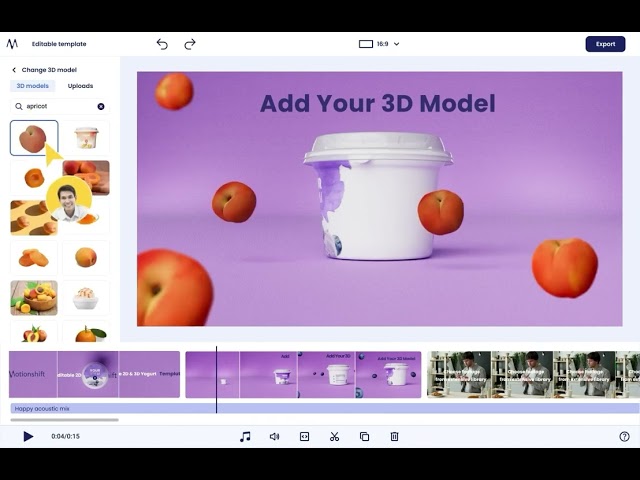
Easy-to-use AI powered template editor with footage, 2D & 3D asset libraries to produce converting videos & ads at scale
Motionshift key features
AI-powered template editor for creating videos and ads quickly and easily.
Customizable video and ad templates optimized for various industries.
Ability to convert website URLs into video ads using AI technology.
Extensive library of over 100,000 free high-quality videos, 3D models, and music.
Easy import of assets from multiple 2D and 3D file formats, including Blender and After Effects.
Motionshift use cases
Create conversion-focused video ads from website URLs in seconds using AI technology.
Utilize customizable templates for video and animation production without requiring advanced skills.
Access a vast library of high-quality videos, 3D models, and music for seamless video creation.
Generate engaging video content tailored for various industries, including restaurants, e-commerce, and fitness.
Import assets from popular design software like Blender and After Effects with ease.
Useful for
Easy-to-use AI-powered template editor allows users to create videos and ads quickly without complex skills.
Offers customizable templates optimized for various industries, enhancing creative performance and saving time.
Converts website URLs into video ads in seconds, streamlining the ad creation process and improving conversion rates.
Provides access to a vast library of high-quality videos, 3D models, and music, facilitating seamless content creation.
Engages audiences with unique video experiences, driving more traffic and enhancing brand visibility.
Price
No specific pricing plans or details are provided in the text.
The application is currently in a beta phase, and users can join a waitlist for early access.
There are mentions of free customizable templates and a library of free assets, but no pricing information is given.
The text emphasizes features and functionalities rather than specific costs or subscription plans.
No information about tiers or payment options is included.
Company
Resources
Website
Facebook
Instagram
LinkedIn
Youtube
Last Reviews
Add review
Compare Motionshift vs Ecomail
Compare Motionshift vs GPT-EZ
Compare Motionshift vs Typing Mind
Frequently asked questions
What is Motionshift useful for?
Easy-to-use AI-powered template editor allows users to create videos and ads quickly without complex skills.
Offers customizable templates optimized for various industries, enhancing creative performance and saving time.
Converts website URLs into video ads in seconds, streamlining the ad creation process and improving conversion rates.
Provides access to a vast library of high-quality videos, 3D models, and music, facilitating seamless content creation.
Engages audiences with unique video experiences, driving more traffic and enhancing brand visibility.
What are the main use cases for Motionshift?
Create conversion-focused video ads from website URLs in seconds using AI technology.
Utilize customizable templates for video and animation production without requiring advanced skills.
Access a vast library of high-quality videos, 3D models, and music for seamless video creation.
Generate engaging video content tailored for various industries, including restaurants, e-commerce, and fitness.
Import assets from popular design software like Blender and After Effects with ease.
What are Motionshift's key features?
AI-powered template editor for creating videos and ads quickly and easily.
Customizable video and ad templates optimized for various industries.
Ability to convert website URLs into video ads using AI technology.
Extensive library of over 100,000 free high-quality videos, 3D models, and music.
Easy import of assets from multiple 2D and 3D file formats, including Blender and After Effects.
How much does Motionshift cost?
No specific pricing plans or details are provided in the text.
The application is currently in a beta phase, and users can join a waitlist for early access.
There are mentions of free customizable templates and a library of free assets, but no pricing information is given.
The text emphasizes features and functionalities rather than specific costs or subscription plans.
No information about tiers or payment options is included.
Similar products
Free
Ecomail
Ecomail - Intuitive Email Marketing and Automation Platform Welcome to Ecomail, your trusted partner for email marketing and automation. We offer easy-to-use tools to help you communicate effectively with your customers, improve engagement, and increase conversions, no matter the size of your business. What does Ecomail offer? - Create and send email campaigns: Design eye-catching and professional email campaigns with our drag-and-drop editor that makes it easy to create beautiful templates and customize them to your needs. - Marketing automation: Set up automated workflows to send targeted messages at the right time, improving customer engagement and increasing loyalty. - Segmentation and personalization: Use powerful segmentation tools to create personalized campaigns that target specific groups of your subscribers based on their behavior and interests. - Analytics and Reports: Get detailed reports and analytics on your campaign results, including open, click, and conversion rates, to optimize your strategies and achieve better results. - Integration with other platforms: Easily integrate Ecomail with popular CRM systems, e-commerce platforms, and other tools to create a unified ecosystem for your business. - Support and Training: Take advantage of our educational resources and support to master the platform’s capabilities and use it effectively to achieve your marketing goals. Why Choose Ecomail? - Simplicity and Convenience: The intuitive interface and tools make it easy to launch and manage email campaigns without the need for complex training. - Flexibility and Scalability: The platform is suitable for businesses of all sizes and can adapt to your needs, from startups to large enterprises. - Quality and Support: We provide high-quality tools and professional support to help you succeed in email marketing. Discover the power of effective email marketing with Ecomail, your trusted platform for creating, automating and analyzing your campaigns.
Free
GPT-EZ
GPT-EZ is a free Chrome extension designed to enhance the user experience for ChatGPT, a conversational language model developed by OpenAI. The extension provides new features to customize the ChatGPT interface and enable users to download and share their conversations in multiple formats. With 15 different color schemes to choose from, users can easily customize the ChatGPT interface according to their preferences. The extension also supports multi-language output, so users can choose the language for each conversation output. GPT-EZ allows users to download their conversations in several formats, including PDF, DOCX, TXT, MD, and PNG, making it easy to store and share conversations outside the ChatGPT platform. Overall, GPT-EZ is a useful tool for ChatGPT users looking to customize their experience and share their conversations in various formats.
Free
Typing Mind
TypingMind is an AI tool that enhances the functionality of ChatGPT, an AI chatbot designed to assist users with various tasks. With TypingMind, users can enjoy faster response times, access to integrated research tools, a prompt library, and more. Unlike some AI chatbots that require users to log in, TypingMind allows users to run the software locally on their browser without requiring any login credentials. One notable feature of TypingMind is its ability to search chat history, which makes it easy for users to quickly retrieve information from previous conversations. The tool also features a prompt library that provides users with pre-determined prompts that can help guide the conversation and improve the effectiveness of the chatbot's responses.To start using TypingMind, users must enter their OpenAI API key in the appropriate field. This allows the tool to connect to the GPT-3.5-turbo model and begin processing user queries. Overall, TypingMind appears to be a valuable addition to the ChatGPT ecosystem and may be useful for individuals or businesses who need a more powerful AI chatbot solution.
Oops! It looks like you need to sign up
Before leaving a review you need to create an account. Don't worry, it only takes a moment and gives you access to exclusive content and updates. Ready to get started?
Cancel
Sign up